

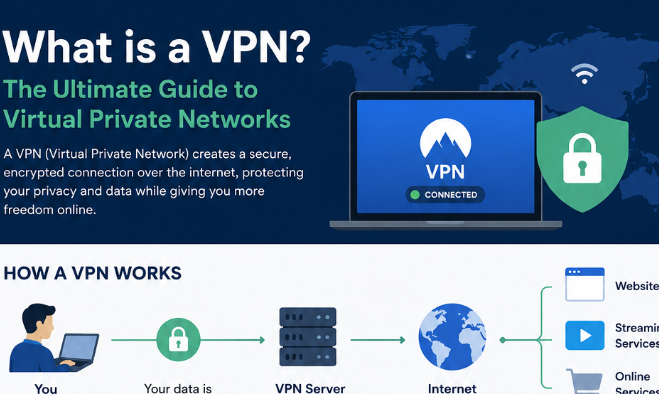
What is a VPN a house made of glass walls. Every time you browse the internet—checking your bank balance, messaging friends, or searching for a late-night snack recipe—everyone walking by can see exactly what you are doing. Your Internet Service Provider (ISP), hackers at the local coffee shop, and even the websites you visit are all peering through those glass walls.
In 2025, digital privacy is not a luxury; it is a necessity. Data breaches, identity theft, and intrusive surveillance are at all-time highs. This is where the term VPN enters the conversation. You have probably seen ads for NordVPN or ExpressVPN on YouTube, but what is it really?
A VPN, or Virtual Private Network, is the solution to that glass house. It adds brick walls, blinds, and a security guard to your internet connection. This article will strip away the technical jargon and explain exactly what a VPN is, how it works, and why you might need one immediately.
What is a VPN? A Simple Analogy (The Armored Truck)
Let us abandon the technical manuals for a moment. Think of the internet as a massive highway. Your data—emails, passwords, credit card numbers—is a letter you are mailing from your home (your device) to a friend (a website like Google or Netflix).
-
Normal Internet: You write the letter, walk outside, and hand it to a postman (your ISP). The postman writes the return address (your IP address) on the envelope and throws it into a clear plastic bag. Everyone on the street can read the letter as he carries it. This is dangerous.
-
With a VPN: You seal the letter in a titanium lockbox. You then hand it to a different courier who puts it inside an armored truck. Before leaving, the truck drives to a separate, secret garage (a VPN server in another city or country). The garage puts a new label on the box (a different IP address) and sends it to your friend. Nobody knows the letter came from you, and nobody can read what is inside.
Definition: A VPN is a service that creates an encrypted, secure tunnel between your device (phone, laptop, tablet) and the wider internet. It masks your real IP address (your digital home address) and routes your traffic through a secure server elsewhere.
How Does a VPN Actually Work? (Behind the Curtain)
You do not need a computer science degree to use a VPN, but understanding the flow of data helps you trust it. Here is the step-by-step process that happens in milliseconds when you click “Connect” on a VPN app:
-
Initiation: Your device sends a request to the VPN server to establish a connection.
-
Handshake & Encryption: The VPN client (the app on your phone) and the server agree on a secret encryption key. They wrap your data in a complex mathematical code (AES-256, the same standard banks and militaries use).
-
Tunneling: The encrypted data travels through a secure “tunnel” to the VPN server. Even if intercepted, the data looks like gibberish.
-
IP Masking: When the data reaches the VPN server, the server replaces your original IP address with its own public IP address. Now, websites think the VPN server is the visitor, not you.
-
Destination & Return: The VPN server sends your request to the website (e.g., Google). Google sends the response back to the VPN server, which then re-encrypts it and sends it back to you.
The result? Your ISP sees only one thing: “User is talking to a VPN server.” They cannot see what you are doing or where you are going.
Why Do You Need a VPN? 5 Critical Reasons
Public Wi-Fi Protection (The Coffee Shop Trap)
Free Wi-Fi at airports, hotels, and cafes is rarely secure. Hackers can set up “evil twin” networks (fake Wi-Fi hotspots) to steal your login credentials. A VPN encrypts your connection, making your data unreadable to anyone sharing that network.
Bypassing Geographic Restrictions (Geo-Spoofing)
Have you tried watching a YouTube video or BBC iPlayer only to see “Not available in your country”? By connecting to a VPN server in the UK or US, you “borrow” that country’s IP address. This fools streaming services into thinking you are a local resident, granting you access to global content libraries.
Stopping ISP Throttling and Data Collection
Your ISP can see if you are streaming Netflix or torrenting files. To save bandwidth, they might throttle (slow down) your speed. Because a VPN hides your activity, your ISP cannot tell if you are streaming 4K video or sending a text file. This often results in consistent, un-throttled speeds.
Safe Torrenting and Anonymous Browsing
When you use peer-to-peer (P2P) sharing, your real IP address is visible to everyone in the “swarm.” Copyright trolls and hackers use this to target you. A VPN hides your IP, ensuring your torrenting activity remains private.
Evading Censorship in Restrictive Countries
Nations like China, Russia, and Iran block social media, news sites, and Google. VPNs (specifically those with “obfuscated servers”) disguise VPN traffic to look like normal HTTPS web traffic, allowing citizens and travelers to access the free internet.
Types of VPNs: Not All Are Created Equal
While most people think of consumer VPNs (NordVPN, Surfshark), there are different architectures.
Remote Access VPN (Consumer Grade)
This is what you buy for 5−15 a month. An individual user connects to a private network (like a VPN provider’s server) to browse the public internet securely.
Site-to-Site VPN (Business Use)
Large companies use this to connect entire office networks together. For example, the New York office network can connect securely to the London office network over the internet, as if they were the same local network.
Mobile VPN (For Unstable Networks)
Unlike standard VPNs that break when you move between Wi-Fi and cellular data, a Mobile VPN maintains the same session and security even if you lose connectivity. This is critical for military or logistics applications.
The Anatomy of a Good VPN: Features to Look For
Not every VPN protects you equally. Here are the non-negotiable features.
The Kill Switch (Your Safety Net)
If your VPN connection drops unexpectedly (even for one second), your device will revert to your normal internet connection, exposing your IP address. A Kill Switch automatically blocks all internet traffic until the VPN reconnects. Without this, you are naked.
No-Logs Policy (Trust, But Verify)
A VPN provider could technically see your activity if they wanted to. A “No-Logs” policy means they promise (and are audited) to never store your browsing history, IP address, or connection timestamps. Look for independent audits by firms like Deloitte or PwC.
Leak Protection (IPv6, DNS, WebRTC)
Sometimes your computer accidentally leaks your real IP address outside the VPN tunnel. Good VPNs automatically block these leaks. You can test this yourself by visiting websites like ipleak.net while connected to the VPN.
The Dark Side: What a VPN Cannot Do (Myth-Busting)
It is vital to understand that a VPN is not a magic privacy bullet.
-
It does not make you anonymous on Google/Facebook: If you log into your Gmail account while using a VPN, Google still knows it is you. It just thinks you are logging in from the VPN server’s location.
-
It does not protect against malware: A VPN encrypts data; it does not scan for viruses. You still need antivirus software.
-
It will not speed up your internet inherently: Encryption adds overhead. While it stops throttling, a VPN usually reduces your raw speed by 10-30% because of the detour.
-
It does not bypass all payment geo-blocks: While you can watch US Netflix from Japan, you usually cannot use a Japanese credit card on Amazon Prime US. Payment methods have geographic fingerprints.
Free vs. Paid VPN: A Critical Comparison Table
| Feature | Free VPN | Paid VPN (e.g., ExpressVPN, NordVPN) |
|---|---|---|
| Monthly Cost | $0 | 2.50−15.00 |
| Data Limit | Usually 500MB to 10GB/month | Unlimited |
| Speed | Severely throttled (slow) | High speed (1Gbps+ servers) |
| Server Locations | 3–10 countries | 60–100+ countries |
| Streaming Access | Rarely works (blocked by Netflix) | Dedicated streaming IPs |
| Logging Policy | Often logs your activity (to sell data) | Audited No-Logs |
| Customer Support | None or Forum only | 24/7 Live Chat |
| Security Risk | High (May contain malware or sell bandwidth) | Low (Open source apps) |
Verdict: Never trust a free VPN for sensitive activities. If you are not paying for the product, you are the product.
Conclusion
In a world where data is more valuable than oil, a VPN is the digital raincoat you wear to stay dry in a thunderstorm of surveillance and cybercrime. While it is not a solution for total anonymity or antivirus protection, it is the single most effective tool for encrypting your traffic, hiding your IP address, and reclaiming your digital freedom.
Whether you are a remote worker logging into sensitive servers, a traveler connecting to airport Wi-Fi, or a movie enthusiast wanting to watch international Netflix, a VPN solves a critical problem: the lack of privacy on the public internet.
The technology is no longer reserved for hackers and IT professionals. It is a mainstream privacy tool, as essential as a locksmith for your front door. Choose a reputable, paid provider with a strict no-logs policy, enable the kill switch, and take back control of your digital life.
FAQs
Q1: Is using a VPN legal?
A: In most countries (USA, UK, Canada, EU), yes. However, authoritarian regimes like China, Russia, Belarus, and Turkmenistan restrict or ban VPN usage. Using a VPN to commit crimes (fraud, hacking) remains illegal everywhere.
Q2: Does a VPN drain my phone battery?
A: Yes, slightly. Because your phone has to encrypt and decrypt every packet of data, you might see 5-15% faster battery drain. Modern protocols like WireGuard are much more efficient than old ones like OpenVPN.
Q3: Can Netflix ban me for using a VPN?
A: Netflix does not “ban” accounts, but it blocks VPN IP addresses. If Netflix detects you are using a VPN, it will show an error message (“You seem to be using an unblocker”). Premium VPNs rotate their IPs frequently to stay ahead of these blocks.
Q4: Do I need a VPN if I have nothing to hide?
A: This is like asking, “Do I need curtains on my bathroom window if I’m not ashamed of my body?” Privacy is a right, not a confession of guilt. You have the right to keep your banking passwords, medical searches, and personal conversations private from corporations and hackers.
Q5: What is the difference between a VPN and Incognito Mode?
A: Incognito/Private Mode only clears your browsing history on your local device (so your family doesn’t see it). It does nothing to hide your activity from your ISP, employer, or hackers. A VPN hides your activity from the network level.
Q6: How do I know if my VPN is working?
A: Before connecting, Google “What is my IP” and write down the number. Connect to your VPN, then Google it again. If the number and location changed (e.g., from New York to London), your VPN is working. Also, use dnsleaktest.com to ensure no leaks.